Photoshop Workflow
AvailableWorks directly with Photoshop: open a PSD template as a safe working copy, select a frame and double-click a photo — it is placed, scaled and clipped into the frame.
Professional Album Designing, Automated.
The album-designing companion for Photoshop: browse thousands of photos, fill PSD templates in seconds, build complete albums with Full Auto and colour-correct whole events — while your original photos stay untouched.
Professional album design software for studios that design wedding and event albums in Photoshop.
Works directly with Photoshop: open a PSD template as a safe working copy, select a frame and double-click a photo — it is placed, scaled and clipped into the frame.
Fast thumbnails that keep each photo’s real portrait / landscape shape, for folders with thousands of photos — with or without sub-folders, used photos marked automatically.
Select several frames in Photoshop and several photos — Quick Fill places each photo into its frame in order, in one step.
Browse the Main, Candid and Reception cameras side by side, synchronised by capture time.
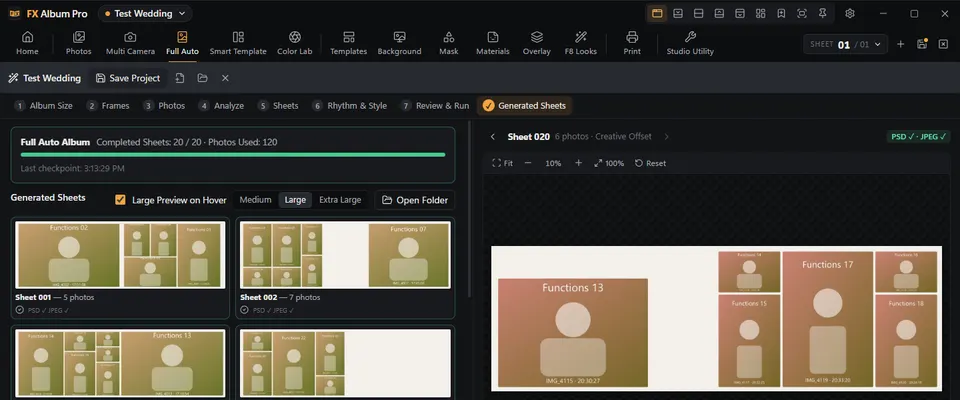
From a folder of event photos to finished album sheets: FX Album Pro plans every sheet in a chosen style, you review it, and Photoshop builds editable PSD and / or JPEG sheets — with Pause, Resume and Stop Safely.
A premium Full Auto style for weddings, engagements and couple stories: three to five strong photos per spread, intentional white space, the couple’s names, the date and occasional elegant quotes — as editable Photoshop text.
Pick photos — only the converted PSD templates that fit their size and orientation mix are shown; double-click fills a working copy in sequence.
Turn any PSD template into an FX Album Pro template: photo targets, orientation and sequence, saved as a new PSD — also for whole folders.
Browse your PSD album templates with their embedded previews and open them in Photoshop as working copies — the master template is never changed.
Auto Enhance, Tone, Color and White Balance per photo, similar-scene consistency and batch correction — corrected copies go to a separate folder, originals stay untouched.
Your design libraries applied in the open Photoshop sheet — with opacity, transform, align, mask and overlay effect controls, and backgrounds for many saved sheets at once.
96 colour looks in 16 families plus your own .cube LUTs, applied as one editable Photoshop adjustment layer with strength and opacity.
The project’s saved sheets in order: print-quality JPEG for the lab, client proof JPEG and a phone-friendly client proof PDF.
Passport and stamp sheets on 6×4, 8×6, 12×8 or custom sizes, background colour replacement, and customer jobs saved by date with search.
Studio tools in one place — Passport Studio and the Template Converter today, more tools added with updates.
New album sheets in common and custom sizes with safe-margin and centre guides; save every sheet as PSD + JPEG, PSD only or JPEG only — numbering never overwrites a sheet.
Create, save, reopen and continue album projects — with checkpoints for long Full Auto runs.
Sign in with your fxalbumpro.in account, use your plan on your own computers, manage devices on the website and install new versions from inside the app.
Subject cut-out using Photoshop’s own Select Subject, where your Photoshop version provides it.
From a folder of event photos to finished, editable album sheets in Photoshop — planned sheet by sheet, reviewed by you, built by Photoshop.

Analyse every photo, correct exposure, tone and white balance individually, keep similar scenes consistent and export corrected copies to a separate folder.
RAW files: browsing with their embedded preview; RAW development is not available yet.

Select the frame layer in Photoshop, double-click a photo — it is placed, scaled and clipped into the frame. Select several frames and several photos — Quick Fill lays out the whole sheet.


A premium album style for weddings, engagements, receptions and couple stories. Instead of filling every corner with photos, each spread carries three to five strong photographs, intentional white space and — where it belongs — the couple’s names, the date or a short, elegant line.

One fxalbumpro.in account for the website and the app.
Create your account, confirm your e-mail and choose a plan. Your dashboard shows the plan, the end date and the days remaining — and renewal is a few clicks.
Sign in to FX Album Pro on your own computers. See them in My Devices and free a place when you change a computer.
New versions appear in FX Album Pro with their notes — What’s New, Improvements, Bug Fixes. Update Now downloads, checks and installs it, then FX Album Pro opens again.
Short videos from installation to finished albums, and a team that helps with activation and the album workflow — also on WhatsApp.
Windows 10 and 11 (64-bit) with Adobe Photoshop installed. Current version v2.4.2.
The macOS version is in development. It is published here once it has been built and tested on a Mac.
17 Nov 2026 · Windows 10 and 11 (64-bit) · 106.0 MB
Windows (.exe) installers only — Windows 11 and 10, 64-bit.
Installing an older version over a newer one keeps your projects and settings — the installer never deletes them. An older version may not open a project that was saved by a newer version, so keep a copy of important projects. Use an older version only if the latest one causes a problem, and update again when a fix is released.
Short videos from installation to finished albums.
All modules included. Updates included while your plan is active.
Up to 2 devices
Up to 2 devices
Prices include the FX Album Pro desktop application for Windows. One licence can be used on up to the plan’s device limit.
For photo labs and large studios — 4 or more devices
Contact: +91 88830 81855 · +91 88709 97799
WhatsApp usPlans, installation, activation or the album workflow — call or message us.
FX MANI · Coimbatore, Tamil Nadu, India · Monday–Saturday, 10:00 AM–7:00 PM
Questions before you start? Call +91 88830 81855 or chat on WhatsApp.

